User guide

How to audit your HubSpot portal with Awtana AI Audit

This guide walks you through the four steps from sign-up to your first blast radius map. It takes about 10 minutes, and Awtana AI Audit never changes anything in your HubSpot portal.

Quick answer

Create an account, connect your HubSpot portal with read-only access, click Run audit to get a health score and findings, then open Blast radius and search any property, form or workflow to see everything that depends on it.

Step 1 · Create your account

How do I create an Awtana AI Audit account?

Click "Audit your HubSpot — free" on the home page and sign up with Google or with your email and a password. The Free plan needs no credit card.

Pick a plan on the pricing section. Free gives you one full audit per month. Intelligence and Agent can be paid right away: after you sign up you go straight to a secure Stripe checkout, monthly or yearly.

Your account creates a workspace automatically. Owners and admins can later invite teammates from Settings.

Tips

  • Use your work email so teammates can recognize the workspace.
  • You can upgrade or change your plan at any time from Settings → Plan & billing.

Animated walkthrough

  1. The visitor clicks "Audit your HubSpot — free".
  2. They enter an email and a password, or choose Google.
  3. The new workspace opens.

Step 2 · Connect HubSpot

How do I connect my HubSpot portal to Awtana AI Audit?

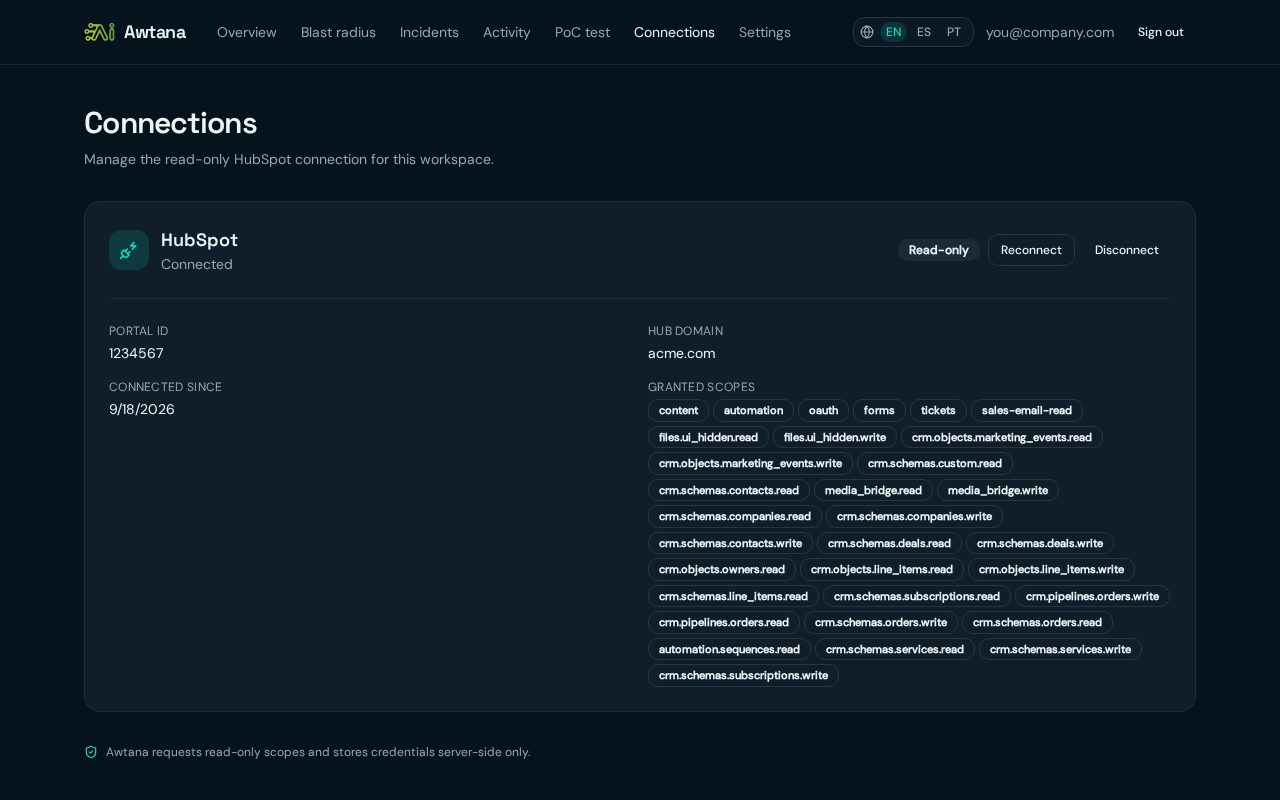
Open Connections, click Connect HubSpot, choose your portal in the HubSpot window and approve the read-only permissions. You return to the app connected.

Awtana AI Audit only asks for read permissions: properties, forms, lists, workflows, pages, owners and pipelines. It cannot create, edit or delete anything in HubSpot.

Once connected, Connections shows the portal ID, hub domain, connection date and the permissions that were granted. You can reconnect or disconnect there at any time.

Tips

  • You need to be a HubSpot Super Admin (or have app-install rights) to approve the connection.
  • If lists or some objects are missing in results, click Reconnect to grant the latest permissions.

Animated walkthrough

  1. The user clicks Connect HubSpot.
  2. HubSpot asks them to pick a portal and approve read-only access.
  3. The connection card turns to Connected.
Awtana AI Audit Connections page showing a HubSpot portal connected with read-only access, portal ID, hub domain and granted scopes
A connected portal with its read-only permissions.

Step 3 · Run the audit and review issues

How do I run a HubSpot audit and review the findings?

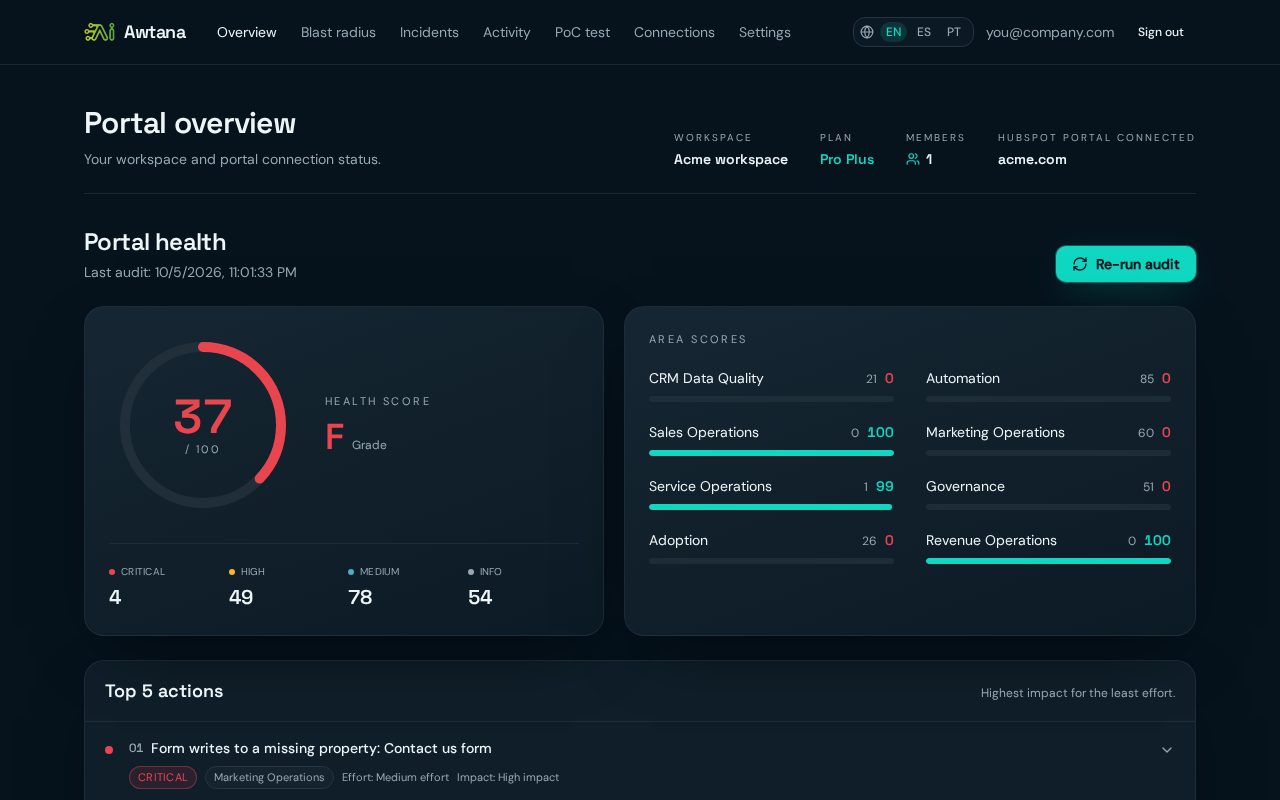
On Overview, click Run audit. In a few minutes you get a health score from 0 to 100, scores for 8 areas, your top 5 actions and the full list of findings by severity.

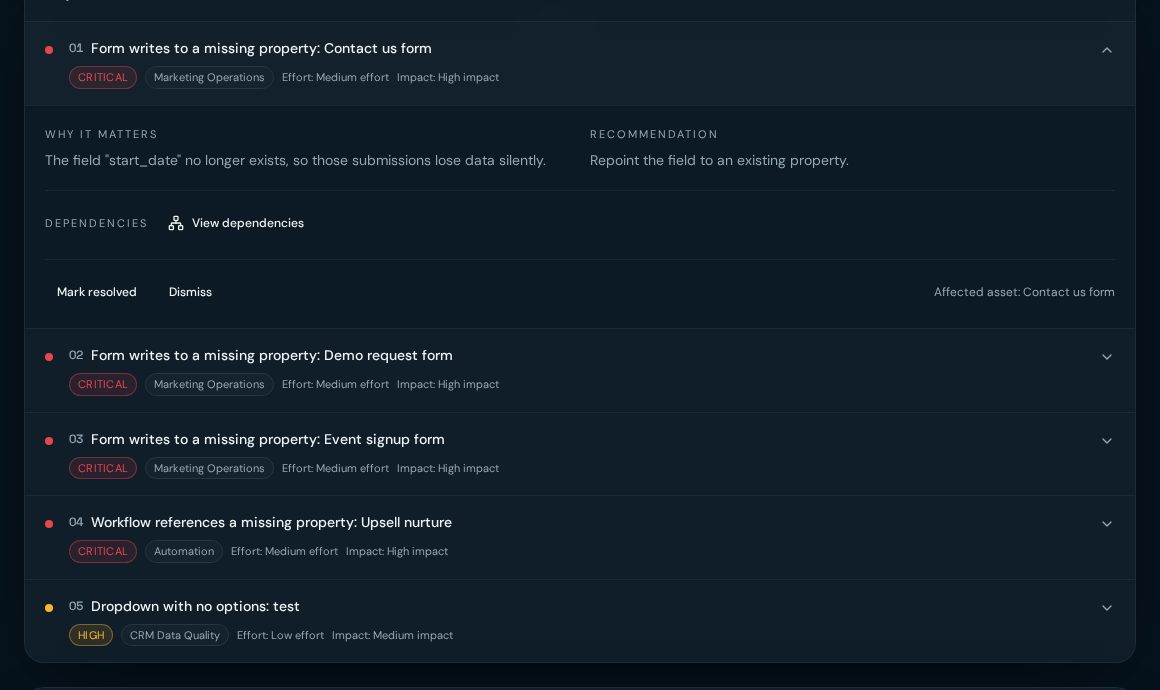
Each finding explains why it matters, what to do about it and which asset is affected. Click View dependencies to see what else is connected to that asset.

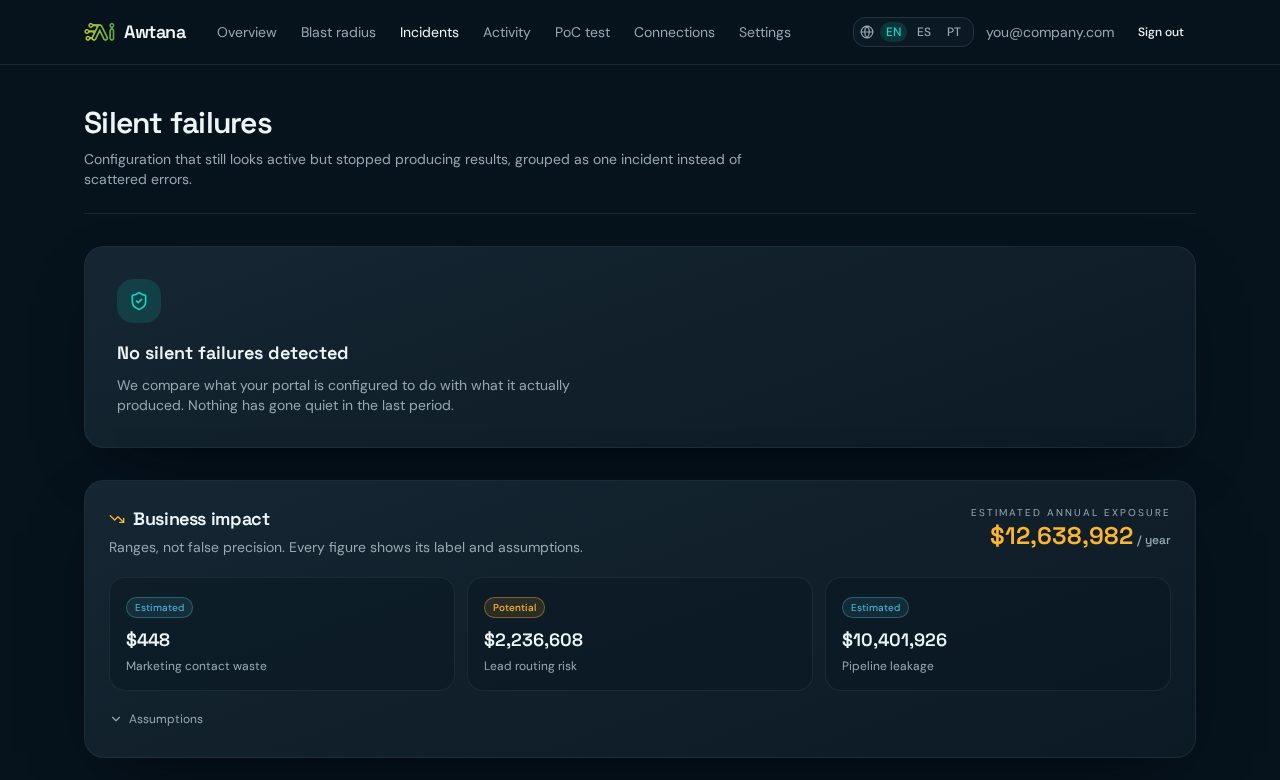
Incidents group findings that point to the same root cause. A silent failure is configuration that still looks active but stopped producing results, like a form writing to a deleted property. Each incident shows its chain, its confidence level and an estimated business impact with visible assumptions.

Tips

  • Start with Critical findings in the Top 5 actions: they have the highest impact for the least effort.
  • Mark findings as resolved or dismissed so the list stays focused.

Animated walkthrough

  1. The user clicks Run audit.
  2. A progress bar fills while the portal is analysed.
  3. The health score and the list of findings appear.
Awtana AI Audit portal overview with a HubSpot health score of 37 out of 100, findings by severity and scores for 8 areas
Health score, severity counts and the 8 area scores.
Top 5 actions list with an expanded finding: a form writes to a missing property, with why it matters and a recommendation
A finding opened: why it matters, the fix, and its dependencies.
Incidents page with silent failure status and estimated annual business impact ranges
Incidents and the estimated business impact, with assumptions.

Step 4 · Explore the blast radius

What is a blast radius in HubSpot and how do I see it?

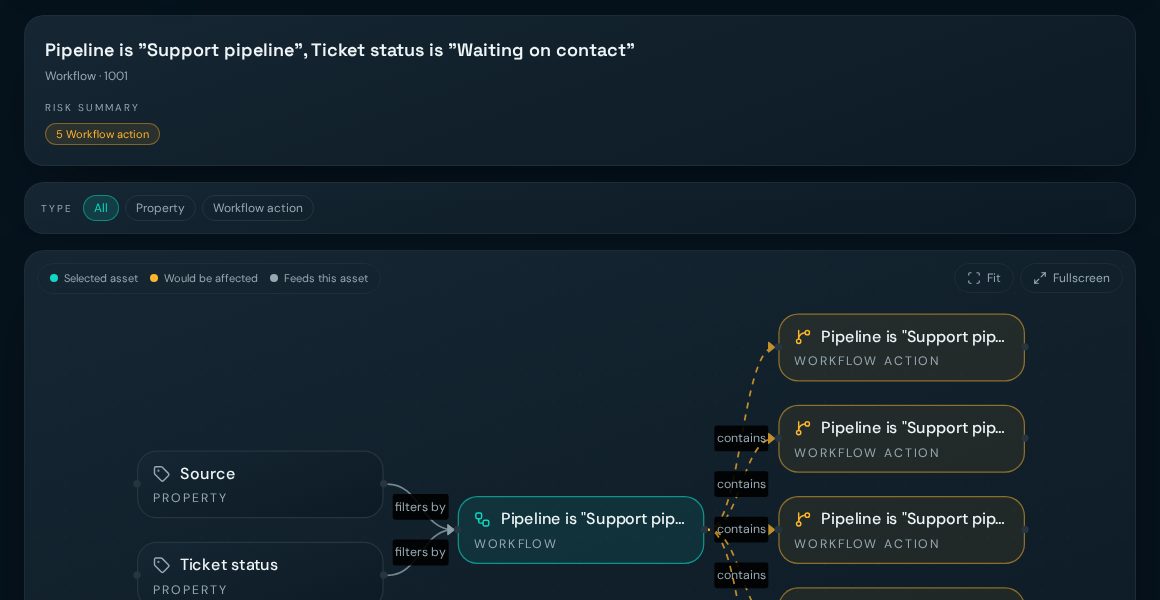
The blast radius is everything that would be affected if you change or delete an asset. Open Blast radius, search a property, form, list or workflow, and the map shows what feeds it and what depends on it.

The map follows real relationships in your portal, for example landing page → form → property → workflow → actions. Teal is the asset you selected, amber is what would be affected, grey is what feeds it.

Use Depth to go 1 to 5 levels out, filter by asset type, switch between Graph and List, and open Fullscreen for large portals.

Tips

  • Check the blast radius before renaming or deleting a property.
  • AI agents connected to Awtana AI Audit can link straight to this map from their answers.

Animated walkthrough

  1. The user searches a property.
  2. The selected asset appears in the center of the map.
  3. Connected forms, workflows and actions light up around it.
Blast radius dependency map in Awtana AI Audit showing properties that feed a HubSpot workflow and the workflow actions it would affect
The map: what feeds the asset (left) and what would be affected (right).

Frequently asked questions

Does Awtana AI Audit change anything in my HubSpot portal?

No. The connection is read-only. Awtana AI Audit reads your configuration and activity, and never creates, edits or deletes anything.

How long does a HubSpot audit take?

Usually a few minutes. Large portals with thousands of assets can take longer. You can leave the page; the result is saved when it finishes.

The audit seems stuck. What should I do?

Refresh the page: the status is read from the saved run. If it still has not finished after 15 minutes, run it again or contact ventas@awtana.com.

Why are lists or some objects missing from my results?

Your connection may have been created before a permission was added. Go to Connections and click Reconnect to approve the latest read-only permissions.

Which plan do I need to see root causes and the blast radius?

Free shows the health score, all findings and incident counts. Intelligence ($79 per portal / month) unlocks root cause, blast radius and business impact. Agent ($299 / month) adds the API and the connection for AI agents.

Ready to audit your portal?

Start free. Connect HubSpot read-only and get your health score in minutes.

Audit your HubSpot — free

Read-only access. Awtana AI Audit never writes to your HubSpot portal.